


Infinite Comics
3.311.00 Reviews
App Specs
- Version
- 1.1.1
- Updated On
- License
- Free
- Downloads
- 100,000+
- Developer
- 無限漫畫
- Categories
- Comics
- Platform
- Android
Screenshots

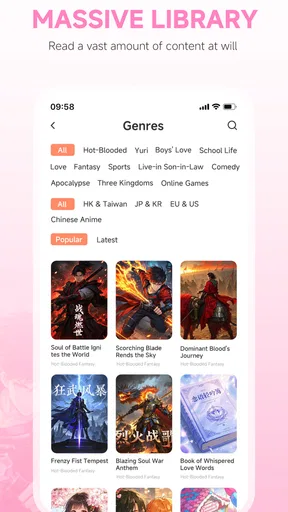
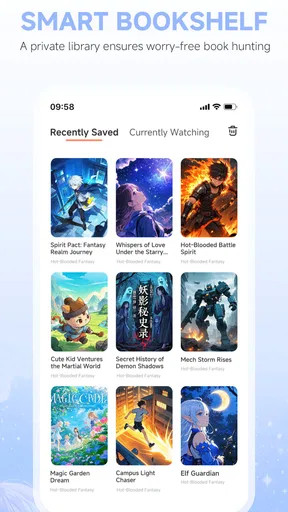



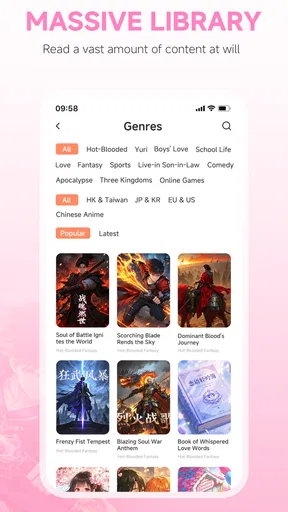
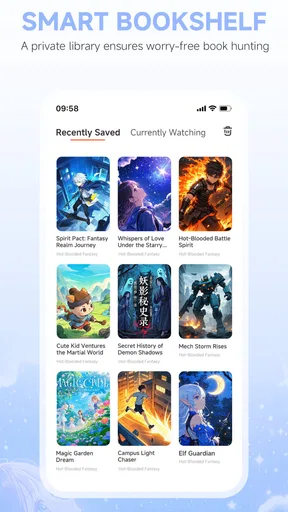
 Analysis by AppCompare
I usually open a comics app with a simple goal: find something worth reading before a spare moment disappears. Infinite Comics is aimed at that kind of browsing, but its appeal depends on what you want from a digital library. It is a free comics app from 無限漫畫, with novels included in its mix, and the store description highlights AI-powered discovery across different genres. That makes it sound broad; in practice, I’d treat it as a place to explore rather than assume it will replace a carefully built collection elsewhere.
From a spare moment to a reading choice
Imagine you have a short ride ahead and want a story that is easy to pick up without planning a whole evening around it. I’d start by browsing for a genre or searching for a title that has caught my attention, then look at whether the available selection suits the time I have. The useful habit here is to decide on a small reading goal first: one chapter, a few pages, or simply a quick sample. A large catalogue can make choosing enjoyable, but it can also turn a five-minute break into five minutes of scrolling.
That distinction matters because Infinite Comics is not only for readers who already know exactly which series they want. Its broad comics-and-novels positioning makes it more attractive to people willing to browse and try unfamiliar material. If I were using it casually, I’d keep a mental note of genres and themes I want to explore instead of searching without direction. It is a small way to make discovery feel intentional rather than endless.
Choosing a screen-friendly way to read
On a phone, panel layout is part of the reading experience, not a minor display setting. A page that feels comfortable on a larger screen may require more zooming on a smaller one, so I would test a few pages before committing to a long session. The store summary points to AI-supported content discovery, but that does not tell me how every recommendation is generated or how consistently it will match a reader’s taste. I’d use suggested material as a starting point, then judge it by the story and artwork rather than treating a recommendation as a guarantee.
A practical approach is to switch between reading and browsing with a clear stopping point. If a comic’s lettering is too small or its page composition feels awkward on your device, continuing out of habit is unlikely to improve the experience. Try another title or format instead. Readers who mainly use tablets may be less bothered by cramped panels, while someone reading one-handed on a compact phone may be more selective about visual clarity and page density.
Where it fits beside other comic options
Compared with a dedicated publisher app, a broad-reading app can be appealing when you want to move between genres instead of staying within one catalogue. Compared with buying individual digital issues, a discovery-first approach can lower the effort of finding something new, though it may not be the best home for a reader whose priority is owning particular editions or following a specific publisher’s releases. Those are different jobs, and I would choose the app around the job rather than expect one service to do everything.
There is also a real cost decision to make. The app is free to install, while in-app purchases range from $0.99 to $17.99 per item. I would check the price shown for an item before committing, especially if I were sampling several stories in one sitting. Free access does not mean every reading choice is free, and individual purchases can add up if browsing turns into a habit. For a reader who wants predictable spending, setting a personal limit before opening a catalogue is a sensible safeguard.
Worth Reading Before You Choose

Flipboard Shows What News Apps Must Do Beyond the Feed

Switching to Android Auto Means Rethinking Your Driving Routine

Google Calendar Makes a Crowded Week Easier to Manage

Ludo King Makes the Most of the Minutes Between Plans

Baby Panda World Brings Quick Play to Modern Phones, but Its Game Library Feels Busy

ESPN’s Live Game View Makes Following Close Games Easier
First Impressions: A Comic Lover’s Paradise
When I first launched the Infinite Comics app, I was greeted by a vibrant and intuitive interface. It’s like stepping into a digital comic book store with all the bells and whistles. The app boasts an extensive library, and I couldn’t help but feel like a kid in a candy store. From Marvel and DC classics to indie gems, there’s something for everyone.
Exploring the Features
The app is packed with features designed to enhance your reading experience. One of my favorites has to be the guided view technology. It’s like having your own personal tour guide through each panel, making every page pop with life. This feature is especially handy when reading on smaller screens, like a smartphone.
Another cool feature is the offline reading mode. You can download your favorite comics and enjoy them anywhere, anytime, without worrying about internet connectivity. Perfect for those long commutes or cozy reading sessions in the park.
A sensible workflow for short sessions
To make those quick reading windows count, I’d browse while I have a reliable connection, choose a story, and prepare what I plan to read before heading out. If I intend to read offline, downloading in advance is the key handoff: discovery happens before the commute, while the actual reading happens later without relying on a signal. I would also open the selected title once before leaving, so I know it is ready and can check that its pages display comfortably.
This routine is especially useful for travel or waiting-room reading, where a dropped connection can interrupt an online session. It also helps separate two kinds of attention: browsing is a decision-making task, while reading is the reward. I would avoid downloading a large pile just because the option exists; choosing a few likely reads keeps the library easier to manage and reduces the chance of spending the whole break deciding what to open.
User Experience: Smooth Sailing
Navigation through the app is a breeze. The developers have done a fantastic job of ensuring that the user interface is both sleek and functional. Finding your way around is as easy as flipping a comic book page. The search function is robust, allowing you to filter by genre, publisher, or even by specific characters.
I also appreciate the customizable reading settings. You can adjust the brightness, choose between different reading modes, and even set reminders for new releases. It’s all about making the app feel like it’s tailored just for you.
Making discovery work for you
When a catalogue offers many possible directions, I find it helpful to search with one specific clue at a time: a genre when I want a mood, a publisher when I want a familiar catalogue, or a character when I already know what I am looking for. That makes browsing less scattershot. I would then save the title I am most interested in for a focused reading session rather than opening several options and losing track of them.
For a reader who follows new releases, reminders may help keep a routine, but I would use them selectively. Too many alerts can turn a relaxing hobby into another stream of notifications. I’d reserve reminders for series I genuinely intend to follow, and let the rest remain discoveries I return to when I have time. That balance makes the app feel like a reading aid instead of a demand for constant attention.
The Comic Community and Social Features
One of the standout aspects of Infinite Comics is its community-driven features. You can join discussions, follow your favorite creators, and even share your thoughts on specific titles. It’s like having a comic con in your pocket!
The app encourages interaction with other users, fostering a vibrant community where fans can geek out together. I found myself spending hours not just reading, but also engaging with fellow comic lovers. It adds a social element that really enriches the overall experience.
When reading turns into conversation
For me, the best use of a discussion space is to add context after finishing a chapter, not to replace the story itself. A quick reaction or a question about a scene can make a solitary read feel shared, while following creators can help me notice work I might otherwise overlook. I would still be mindful of spoilers when joining a conversation before I have caught up; the more social the reading experience becomes, the easier it is to encounter plot details ahead of time.
This part of the app will matter more to readers who enjoy talking through what they read than to people who treat comics as a private, quiet break. If you prefer to read without notifications or community activity, you can focus on the stories and leave the social side alone. The app’s broader appeal is that it can support both habits, but the reader has to decide how much conversation improves the session.
What Could Be Improved
No app is perfect, and Infinite Comics is no exception. While the library is vast, there are still a few notable absences. Some classic titles are missing, which might disappoint hardcore fans. However, the developers seem committed to expanding their collection, so fingers crossed for future updates.
Another area that could use some work is the speed of the app. Occasionally, I experienced some lag, especially when loading high-resolution comics. Hopefully, this is something that can be optimized in upcoming versions.
Where the flow can break
The main frustration I ran into was that a promising browsing session does not always lead to the exact title I want. Missing classics are a meaningful limitation if your reading life revolves around a particular back catalogue; in that case, I would check a publisher’s own service or another source that clearly carries the series before making this my main destination. A varied selection is valuable, but breadth is not the same as completeness.
Loading delays can also interrupt the transition from choosing a comic to settling into it, particularly when I am eager to start a visually detailed page. If that happens, I would give the content time to load before repeatedly tapping or changing settings, since rapid retries can make it harder to tell whether the issue is temporary or tied to a specific page. For an impatient reader or someone who expects instant access every time, that occasional wait may be more noticeable than it is for someone reading at home.
Who should make room for it
I think the app is a better fit for curious readers who like switching between comics and novels, searching across genres, and occasionally talking about what they have read. It may also suit someone who wants a free starting point and is comfortable checking item costs before buying. Teen is the content rating, so it is worth keeping that in mind when choosing what younger readers browse; the rating does not mean every title will suit every teen, and parents may want to guide selections.
I would be less likely to recommend it as a sole library for collectors who need a specific run, complete publisher coverage, or a particular edition. The same goes for readers who dislike in-app purchases or want to know in advance that every title they find is included at no extra cost. If a tightly curated catalogue or guaranteed access to named series is your priority, a specialist alternative may be the more reliable match.
Compatibility and a final check
Infinite Comics is currently at version 1.0.9 and supports Android 7.0 and newer. That makes checking the operating system a practical first step before installing, especially on an older phone kept for reading. It has a 3.5 average from 657 ratings and more than 50,000 installs, which gives a useful sense of its current audience without telling me whether it will suit an individual reader’s tastes. The app was released on May 6, 2025, and 無限漫畫 is its developer.
My recommendation is to approach it as a flexible place to discover material, not as a promise that every favorite series will be there or that every item is included for free. Start with a clear search, test a few pages on your device, and decide whether its reading and community options fit the way you actually spend your comic time. If the catalogue matches your interests and you are comfortable with the purchase model, it is worth trying; if your needs are more specific, choose a service built around those needs instead.
Final Thoughts
All in all, Infinite Comics is a delightful app that brings the joy of comics to your fingertips. Its combination of an extensive library, innovative features, and a strong community makes it a must-have for any comic book aficionado. Despite a few minor hiccups, the app delivers on its promise to transform your reading experience.
If you’re a comic fan looking to take your collection digital or simply want to explore new titles, give Infinite Comics a try. You might just find your new favorite way to enjoy those beloved illustrated adventures.
Pros
- Vast library of diverse comic genres.
- Smooth navigation and user-friendly interface.
- Offline access to downloaded comics.
- Regular updates with new releases.
- Customizable reading settings.
Cons
- Requires subscription for premium content.
- Occasional app crashes reported by users.
- Limited language options for comics.
- Ads present in the free version.
- Some features locked behind paywall.
FAQs for Infinite Comics
What is Infinite Comics and what makes it unique?
Infinite Comics is a digital comic book app offering an extensive library of comics from various genres and publishers. What sets it apart is its interactive storytelling feature, allowing for dynamic panel transitions and animations that enhance the reading experience, making it more immersive than traditional comic apps.
Is Infinite Comics available for both Android and iOS devices?
Yes, Infinite Comics is available for download on both Android and iOS platforms. Users can access the app through the Google Play Store for Android devices and the Apple App Store for iOS devices, ensuring compatibility across a wide range of smartphones and tablets.
Does Infinite Comics require a subscription, or is it free to use?
Infinite Comics offers a freemium model. Users can access a selection of free comics, but a subscription is required to unlock the full library and enjoy premium features. The subscription provides unlimited access to all comics, exclusive content, and ad-free reading, enhancing the overall experience.
Can I read comics offline with Infinite Comics?
Yes, Infinite Comics allows users to download comics for offline reading. This feature is particularly useful for those who want to enjoy their favorite stories without an internet connection, making it perfect for reading on the go or in areas with limited connectivity.
How often is new content added to Infinite Comics?
Infinite Comics regularly updates its library with new releases and classic titles. Typically, new content is added weekly, ensuring a steady stream of fresh comics for subscribers. Additionally, the app often features exclusive releases and early access to certain titles for premium users.


